Reminder PillNew
A glass Remind me pill that grows later today, tomorrow, this weekend and next week out of itself, then reads the time by a red bell.
By Saivion
Live preview
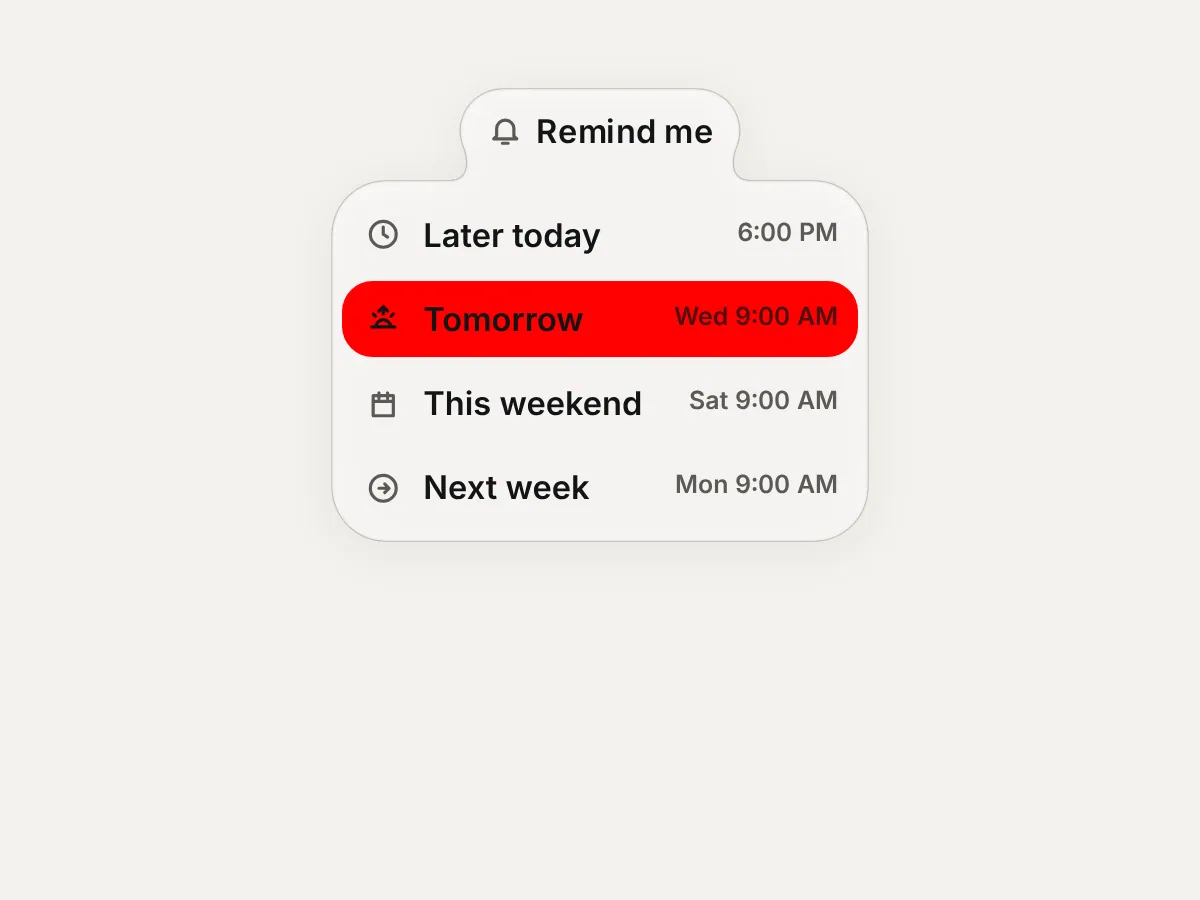
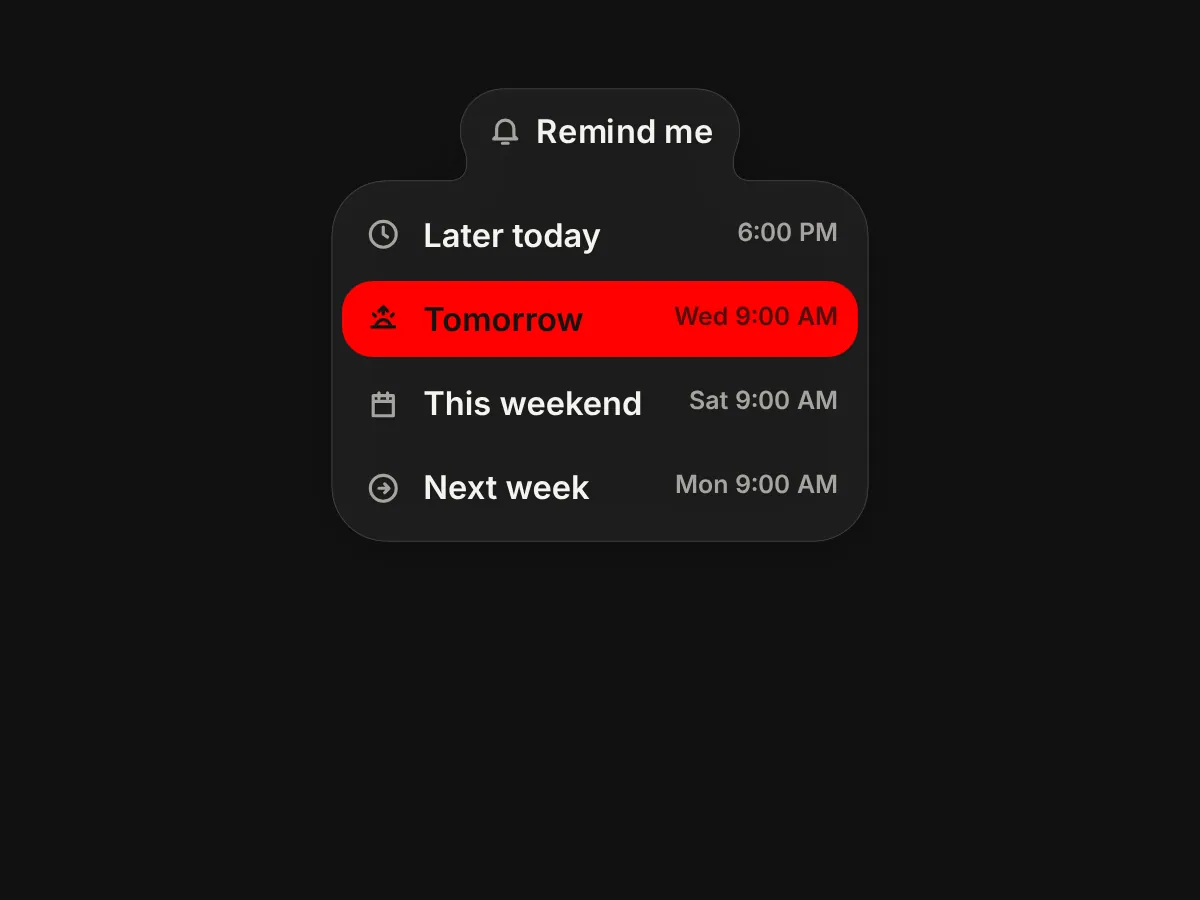
Reminder Pill, a SwiftUI Remind Me Later Picker for iOS 17+, in its live preview. Open Code for the Swift source.
// Copyright (c) 2026 Saivion Hayes
//
// Permission is hereby granted, free of charge, to any person obtaining a copy
// of this software and associated documentation files (the "Software"), to deal
// in the Software without restriction, including without limitation the rights
// to use, copy, modify, merge, publish, and distribute the Software as part of
// an application, website, or product, subject to the following conditions:
//
// The above copyright notice and this permission notice shall be included in all
// copies or substantial portions of the Software.
//
// Commons Clause Restriction
//
// You may use this Software, including for any commercial purpose, so long as
// you do not sell, sublicense, or redistribute the components themselves, whether
// alone, in a bundle, or as a ported version.
//
// THE SOFTWARE IS PROVIDED "AS IS", WITHOUT WARRANTY OF ANY KIND, EXPRESS OR
// IMPLIED, INCLUDING BUT NOT LIMITED TO THE WARRANTIES OF MERCHANTABILITY,
// FITNESS FOR A PARTICULAR PURPOSE AND NONINFRINGEMENT. IN NO EVENT SHALL THE
// AUTHORS OR COPYRIGHT HOLDERS BE LIABLE FOR ANY CLAIM, DAMAGES OR OTHER
// LIABILITY, WHETHER IN AN ACTION OF CONTRACT, TORT OR OTHERWISE, ARISING FROM,
// OUT OF OR IN CONNECTION WITH THE SOFTWARE OR THE USE OR OTHER DEALINGS IN THE
// SOFTWARE.
import SwiftUI
/// Colors for `ReminderPill`. `.standard` is the house palette.
public struct ReminderPillStyle: Sendable {
/// The row under the chosen time, and the bell once a reminder is set.
public var accent: Color
/// A row's text while it sits on the accent.
public var onAccent: Color
/// The pill's text and the row titles.
public var label: Color
/// The bell before a reminder is set, the row icons and the times.
public var secondaryLabel: Color
/// The remove row.
public var destructive: Color
public init(
accent: Color = Color(red: 1, green: 0, blue: 0),
onAccent: Color = ReminderPillStyle.adaptive(light: 0x141414, dark: 0x141414),
label: Color = ReminderPillStyle.adaptive(light: 0x141414, dark: 0xF4F3EF),
secondaryLabel: Color = ReminderPillStyle.adaptive(light: 0x5C5A56, dark: 0xA6A49F),
destructive: Color = Color(red: 1, green: 0, blue: 0)
) {
self.accent = accent
self.onAccent = onAccent
self.label = label
self.secondaryLabel = secondaryLabel
self.destructive = destructive
}
public static let standard = ReminderPillStyle()
/// A color that follows the appearance, from two 0xRRGGBB values.
public static func adaptive(light: UInt32, dark: UInt32) -> Color {
Color(UIColor { @Sendable traits in
let hex = traits.userInterfaceStyle == .dark ? dark : light
return UIColor(red: CGFloat(hex >> 16 & 0xFF) / 255, green: CGFloat(hex >> 8 & 0xFF) / 255, blue: CGFloat(hex & 0xFF) / 255, alpha: 1)
})
}
}
/// A glass Remind me pill that grows a short list of times out of itself, joined beneath it.
///
/// The pill keeps its own size in your layout and the panel opens over what is below it, centred under the pill, so
/// give the pill a higher `zIndex` than the views after it if they draw on top, and leave about 140 points either side
/// of its centre for the panel. Scheduling the notification itself is yours: watch `date` and hand it to
/// `UNUserNotificationCenter`.
///
/// - Parameters:
/// - title: The pill's text while no reminder is set.
/// - date: When to remind, or `nil` for no reminder. Choosing a row sets it; Remove reminder clears it.
/// - options: The times to offer. Defaults to later today, tomorrow, this weekend and next week, worked out from now.
/// - style: Colors. Defaults to the house palette, adapting to light and dark.
public struct ReminderPill: View {
public typealias Style = ReminderPillStyle
/// One time on the list.
public struct Option: Identifiable, Sendable {
public var id: String
public var title: String
public var systemImage: String
public var date: Date
public init(id: String, title: String, systemImage: String, date: Date) {
self.id = id
self.title = title
self.systemImage = systemImage
self.date = date
}
/// Later today at 6 PM (or in three hours, past 3 PM), tomorrow at 9 AM, Saturday at 9 AM and Monday at 9 AM.
public static func standard(from now: Date = .now, calendar: Calendar = .current) -> [Option] {
func at(_ hour: Int, _ day: Date) -> Date {
calendar.date(bySettingHour: hour, minute: 0, second: 0, of: day) ?? day
}
let evening = at(18, now)
let later = calendar.component(.hour, from: now) < 15 ? evening : now.addingTimeInterval(3 * 3600)
let tomorrow = calendar.date(byAdding: .day, value: 1, to: now) ?? now
let saturday = calendar.nextDate(after: now, matching: DateComponents(weekday: 7), matchingPolicy: .nextTime) ?? tomorrow
let monday = calendar.nextDate(after: now, matching: DateComponents(weekday: 2), matchingPolicy: .nextTime) ?? tomorrow
return [
Option(id: "later", title: "Later today", systemImage: "clock", date: later),
Option(id: "tomorrow", title: "Tomorrow", systemImage: "sunrise", date: at(9, tomorrow)),
Option(id: "weekend", title: "This weekend", systemImage: "calendar", date: at(9, saturday)),
Option(id: "week", title: "Next week", systemImage: "arrow.right.circle", date: at(9, monday)),
]
}
}
@Environment(\.accessibilityReduceMotion) private var reduceMotion
@Environment(\.isEnabled) private var isEnabled
@Binding private var date: Date?
@State private var isOpen = false
/// The date the pill reads. It changes once the panel has drained back, so the new time lands in the pill.
@State private var shown: Date?
/// The row under the red highlight, while the panel is open.
@State private var picked: String?
@State private var options: [Option]
@State private var closing: Task<Void, Never>?
private let title: String
private let given: [Option]?
private let style: Style
public init(_ title: String = "Remind me", date: Binding<Date?>, options: [Option]? = nil, style: Style = .standard) {
self.title = title
self._date = date
self.given = options
self.style = style
self._shown = State(initialValue: date.wrappedValue)
self._options = State(initialValue: options ?? Option.standard())
}
private static let width: CGFloat = 280
private static let rowHeight: CGFloat = 44
private var rowCount: Int { options.count + (date == nil ? 0 : 1) }
public var body: some View {
ReminderPillShell(isOpen: isOpen, panelSize: CGSize(width: Self.width, height: CGFloat(rowCount) * Self.rowHeight + 12), toggle: toggle) {
HStack(spacing: 8) {
Image(systemName: shown == nil ? "bell" : "bell.fill")
.foregroundStyle(shown == nil ? style.secondaryLabel : style.accent)
.contentTransition(.symbolEffect(.replace))
PieceMorphText(text: shown.map(Self.phrase) ?? title, font: .body.weight(.semibold))
.foregroundStyle(style.label)
}
.accessibilityElement(children: .ignore)
.accessibilityLabel(title)
.accessibilityValue(shown.map(Self.phrase) ?? "Off")
.accessibilityHint(isOpen ? "Closes the reminder times" : "Opens the reminder times")
.accessibilityAddTraits(.isButton)
} panel: {
ZStack(alignment: .top) {
if let index = options.firstIndex(where: { $0.id == picked }) {
RoundedRectangle(cornerRadius: 16, style: .continuous)
.fill(style.accent)
.frame(height: Self.rowHeight - 4)
.padding(.horizontal, 6)
.offset(y: CGFloat(index) * Self.rowHeight + 2)
.transition(.opacity)
}
VStack(spacing: 0) {
ForEach(options) { option in
row(option)
}
if date != nil {
removeRow
}
}
}
.padding(.vertical, 6)
}
.fontWeight(.semibold)
.opacity(isEnabled ? 1 : 0.45)
.sensoryFeedback(.selection, trigger: picked)
.onChange(of: date) { _, new in
guard !isOpen else { return }
withAnimation(PieceMotion(reduceMotion: reduceMotion).morph) { shown = new }
}
}
private func row(_ option: Option) -> some View {
let on = picked == option.id
return Button { choose(option) } label: {
HStack(spacing: 10) {
Image(systemName: option.systemImage)
.frame(width: 22)
.foregroundStyle(on ? style.onAccent : style.secondaryLabel)
Text(option.title)
.foregroundStyle(on ? style.onAccent : style.label)
Spacer(minLength: 8)
Text(Self.detail(option.date))
.font(.footnote.weight(.semibold))
.monospacedDigit()
.foregroundStyle(on ? style.onAccent.opacity(0.75) : style.secondaryLabel)
}
.font(.body.weight(.semibold))
.lineLimit(1)
.padding(.horizontal, 16)
.frame(height: Self.rowHeight)
.contentShape(.rect)
.animation(.easeOut(duration: 0.2), value: on)
}
.buttonStyle(.plain)
.accessibilityLabel(option.title)
.accessibilityValue(Self.detail(option.date))
.accessibilityAddTraits(on ? .isSelected : [])
}
private var removeRow: some View {
Button(action: remove) {
HStack(spacing: 10) {
Image(systemName: "bell.slash")
.frame(width: 22)
Text("Remove reminder")
Spacer(minLength: 0)
}
.font(.body.weight(.semibold))
.foregroundStyle(style.destructive)
.padding(.horizontal, 16)
.frame(height: Self.rowHeight)
.contentShape(.rect)
}
.buttonStyle(.plain)
}
// MARK: Text
/// "Today, 6 PM", "Tomorrow, 9 AM", "Saturday, 9 AM" or "Dec 4, 9 AM".
static func phrase(_ date: Date) -> String {
let calendar = Calendar.current
let time = date.formatted(Date.FormatStyle().hour().minute(.twoDigits)).replacingOccurrences(of: ":00", with: "")
let day: String
if calendar.isDateInToday(date) {
day = "Today"
} else if calendar.isDateInTomorrow(date) {
day = "Tomorrow"
} else if let days = calendar.dateComponents([.day], from: calendar.startOfDay(for: .now), to: calendar.startOfDay(for: date)).day, days < 7, days > 0 {
day = date.formatted(.dateTime.weekday(.wide))
} else {
day = date.formatted(.dateTime.month(.abbreviated).day())
}
return "\(day), \(time)"
}
/// "6:00 PM" today, "Tue 9:00 AM" on another day.
static func detail(_ date: Date) -> String {
let time = date.formatted(date: .omitted, time: .shortened)
return Calendar.current.isDateInToday(date) ? time : "\(date.formatted(.dateTime.weekday(.abbreviated))) \(time)"
}
// MARK: Actions
private func toggle() {
closing?.cancel()
if isOpen {
close()
} else {
if given == nil { options = Option.standard() }
picked = options.first(where: { $0.date == date })?.id
isOpen = true
}
}
private func choose(_ option: Option) {
withAnimation(PieceMotion(reduceMotion: reduceMotion).snap) { picked = option.id }
date = option.date
closing?.cancel()
closing = Task { @MainActor in
try? await Task.sleep(for: .milliseconds(reduceMotion ? 120 : 380))
guard !Task.isCancelled else { return }
close()
}
}
private func remove() {
withAnimation(PieceMotion(reduceMotion: reduceMotion).snap) { picked = nil }
date = nil
closing?.cancel()
close()
}
private func close() {
isOpen = false
closing = Task { @MainActor in
try? await Task.sleep(for: .milliseconds(reduceMotion ? 60 : 200))
guard !Task.isCancelled else { return }
withAnimation(PieceMotion(reduceMotion: reduceMotion).morph) { shown = date }
}
}
}
/// The glass pill and the panel that grows out of it: the panel is born the pill's own size, on top of it, and grows
/// down into place, joined beneath by a short neck of glass. Closing, it drains back into the pill before it goes.
private struct ReminderPillShell<Label: View, Panel: View>: View {
var isOpen: Bool
var panelSize: CGSize
var toggle: () -> Void
@ViewBuilder var label: Label
@ViewBuilder var panel: Panel
@Environment(\.accessibilityReduceMotion) private var reduceMotion
@ScaledMetric(relativeTo: .body) private var height: CGFloat = 44
@State private var pillSize = CGSize(width: 140, height: 44)
@State private var present = false
@State private var out = false
/// Each open or close takes a turn, so a step still waiting from an earlier one is skipped.
@State private var turn = 0
var body: some View {
PieceLiquidGroup {
Button(action: toggle) {
label
.padding(.horizontal, 16)
.frame(height: height)
.pieceLiquid(Capsule())
.contentShape(Capsule())
}
.buttonStyle(PieceLiquidPressStyle())
.onGeometryChange(for: CGSize.self) { $0.size } action: { pillSize = $0 }
.overlay(alignment: .top) { grown }
}
.onChange(of: isOpen) { _, open in open ? grow() : drain() }
}
@ViewBuilder private var grown: some View {
if present {
let size = out ? panelSize : pillSize
panel
.frame(width: panelSize.width, height: panelSize.height, alignment: .top)
.pieceBudContent(out: out)
.frame(width: size.width, height: size.height, alignment: .top)
.clipShape(RoundedRectangle(cornerRadius: out ? 28 : size.height / 2, style: .continuous))
.pieceLiquid(RoundedRectangle(cornerRadius: out ? 28 : size.height / 2, style: .continuous), interactive: false)
.offset(y: out ? pillSize.height + PieceLiquid.joined : 0)
.animation(PieceMotion(reduceMotion: reduceMotion).morph, value: panelSize)
}
}
private func grow() {
var quiet = Transaction()
quiet.disablesAnimations = true
withTransaction(quiet) { present = true }
turn += 1
let mine = turn
Task { @MainActor in
try? await Task.sleep(for: .milliseconds(24))
guard turn == mine else { return }
withAnimation(PieceLiquid.split(reduceMotion: reduceMotion)) { out = true }
}
}
private func drain() {
withAnimation(PieceLiquid.home(reduceMotion: reduceMotion)) { out = false }
turn += 1
let mine = turn
Task { @MainActor in
try? await Task.sleep(for: .milliseconds(520))
guard turn == mine else { return }
var quiet = Transaction()
quiet.disablesAnimations = true
withTransaction(quiet) { present = false }
}
}
}
// MARK: - Example
/// A saved article, with a nudge to read it later.
private struct ReminderPillExample: View {
@State private var remindAt: Date?
var body: some View {
VStack(spacing: 14) {
Text("Read it later")
.font(.subheadline.weight(.semibold))
.foregroundStyle(ReminderPillStyle.standard.secondaryLabel)
ReminderPill(date: $remindAt)
.zIndex(1)
Spacer()
}
.padding(.top, 120)
.frame(maxWidth: .infinity, maxHeight: .infinity)
.background(ReminderPillStyle.adaptive(light: 0xF3F2EE, dark: 0x121212))
}
}
#Preview("Light") {
ReminderPillExample()
}
#Preview("Dark") {
ReminderPillExample()
.preferredColorScheme(.dark)
}
// MARK: - Piece motion
//
// The SwiftPieces motion language: shared spring tokens and gesture physics, with the same values in every
// piece. Each piece carries a copy of only the parts it uses, so this file stands alone. Generated from
// registry/foundation/PieceMotion.swift in the SwiftPieces repo; edit it there, not here.
// swiftpieces-motion: 1.1.0 (core, pressMath)
/// The SwiftPieces motion language: five spring tiers, and a named role for every moment a piece moves,
/// each with its Reduce Motion substitute.
///
/// Build one from the environment, `PieceMotion(reduceMotion: reduceMotion)`, and pick the role that names
/// what just happened. Never animate the tracking of a finger: set gesture state directly in `onChanged`, so the
/// surface stays under the finger, and spring only the release.
private struct PieceMotion {
var reduceMotion = false
// Tiers. Overshoot and settle times are measured from rest with SwiftUI's Spring.
/// No overshoot, 90% in about 90ms. A press arriving under the finger.
static var tight: Spring { Spring(duration: 0.14, bounce: 0) }
/// About 2.8% overshoot, 90% in about 140ms. Snapping to a detent, page or segment.
static var responsive: Spring { Spring(duration: 0.32, bounce: 0.25) }
/// About 8.4% overshoot. Visible give: a release, a return from past an edge, a drag settling home.
static var elastic: Spring { Spring(duration: 0.42, bounce: 0.38) }
/// About 15% overshoot. A resolved action landing. At most once per interaction.
static var expressive: Spring { Spring(duration: 0.48, bounce: 0.48) }
/// About 1.5% overshoot, unhurried. Opening large surfaces and ambient change.
static var calm: Spring { Spring(duration: 0.5, bounce: 0.2) }
/// Reduce Motion: settles become this short spring with no overshoot.
private static var still: Animation { .spring(duration: 0.25, bounce: 0) }
// Roles.
/// Touch-down. Starts on the same frame and never bounces under the finger.
var press: Animation { .spring(Self.tight) }
/// The finger lifts off a pressed surface, which springs back through rest.
var release: Animation { reduceMotion ? Self.still : .spring(Self.elastic) }
/// A dragged thing comes to rest. With a gesture's velocity, use `settle(velocity:from:to:)` instead.
var settle: Animation { reduceMotion ? Self.still : .spring(Self.elastic) }
/// Lands on a detent, page or segment.
var snap: Animation { reduceMotion ? Self.still : .spring(Self.responsive) }
/// A number, a chart value or anything else people read moves to its new value. Never overshoots, so it
/// never shows a value that isn't true.
var value: Animation { reduceMotion ? Self.still : .spring(duration: 0.35, bounce: 0) }
/// Comes back from past a limit: a pull beyond the edge, a value pushed against its bound.
var rebound: Animation { reduceMotion ? Self.still : .spring(Self.elastic) }
/// A shape or container changes size, corner radius or form, with a little give at the end.
var morph: Animation { reduceMotion ? Self.still : .spring(duration: 0.4, bounce: 0.2) }
/// Something appears, opens or expands. Opening is a little slower than closing.
var reveal: Animation { reduceMotion ? .easeOut(duration: 0.2) : .spring(Self.calm) }
/// Something leaves, closes or collapses. Quick and firm, out of the way.
var dismiss: Animation { reduceMotion ? .easeIn(duration: 0.18) : .spring(duration: 0.3, bounce: 0.08) }
/// A resolved action lands: a check, a sent state, a reaction.
var success: Animation { reduceMotion ? .easeOut(duration: 0.24) : .spring(Self.expressive) }
/// A refused action. Firm, no wobble; `pieceShake` adds the movement.
var error: Animation { reduceMotion ? .easeOut(duration: 0.2) : .spring(Self.responsive) }
/// Slow ambient change. Loops themselves stop under Reduce Motion: check `allowsAmbient`.
var ambient: Animation { reduceMotion ? .easeInOut(duration: 0.3) : .spring(Self.calm) }
/// Loops, drifts, idle breathing and parallax run only when this is true.
var allowsAmbient: Bool { !reduceMotion }
/// A moving transition, or a plain fade under Reduce Motion.
func transition(_ transition: AnyTransition) -> AnyTransition {
reduceMotion ? .opacity : transition
}
/// For content replaced inside a container that stays put (a label, a glyph, a count): the old content
/// blurs out as the new one sharpens in. A fade under Reduce Motion.
@MainActor var swap: AnyTransition {
reduceMotion ? .opacity : AnyTransition(.blurReplace)
}
}
extension PieceMotion {
/// About `depth` points per edge, not a fixed percentage: an icon sinks to 0.92, a pill 0.95, a card 0.985.
nonisolated static func pressScale(for size: CGSize, depth: CGFloat = 2.5) -> CGFloat {
let side = (max(size.width, 1) * max(size.height, 1)).squareRoot()
return min(max(1 - depth * 2 / side, 0.92), 0.985)
}
/// An anchor partway from the center toward the touch, so the press leans into the finger without tipping.
nonisolated static func pressAnchor(touch: CGPoint?, in size: CGSize, lean: CGFloat = 0.6) -> UnitPoint {
guard let touch, size.width > 0, size.height > 0 else { return .center }
let x = min(max(touch.x / size.width, 0), 1)
let y = min(max(touch.y / size.height, 0), 1)
return UnitPoint(x: 0.5 + (x - 0.5) * lean, y: 0.5 + (y - 0.5) * lean)
}
}
// swiftpieces-motion: end
// MARK: - Piece liquid
//
// The SwiftPieces liquid glass language: glass shapes that merge through a neck, bubbles that bud out of
// and melt back into each other, and the frosted fallback before iOS 26. Each piece carries a copy of only
// the parts it uses, so this file stands alone. Generated from registry/foundation/PieceLiquid.swift in the
// SwiftPieces repo; edit it there, not here. The rules are in LIQUID_GLASS.md.
// swiftpieces-liquid: 1.8.0 (liquid, liquidPress, bud, morphText)
/// The liquid glass language: one merge distance, two rest gaps, and the springs a bubble leaves and comes home on.
///
/// Glass shapes inside one `PieceLiquidGroup` melt into each other through a neck when they come within `merge`
/// points. Parts of one control rest `joined`, inside that distance, so the neck holds; separate actions rest
/// `apart`, outside it, so they only goo while one buds out of, or melts back into, another.
private enum PieceLiquid {
/// Glass shapes closer than this share a neck.
static let merge: CGFloat = 20
/// The gap between parts of one control (a stepper's buttons, a progress pill and its stop): the neck holds,
/// short and smooth, about two thirds of the shapes' height at its waist. Joined parts read best at one height.
static let joined: CGFloat = 4
/// The gap between separate actions (menu items, confirm and cancel, chips): they rest as their own bubbles.
static let apart: CGFloat = 26
/// How far a bubble shrinks while it is home inside its parent.
static let homeScale: CGFloat = 0.72
/// A bubble leaving its parent: slow enough that the neck's stretch and snap read.
static func split(reduceMotion: Bool) -> Animation {
reduceMotion ? .easeOut(duration: 0.2) : .spring(duration: 0.62, bounce: 0.22)
}
/// A bubble going home. No bounce: a bounce would carry it out through the far side of its parent.
static func home(reduceMotion: Bool) -> Animation {
reduceMotion ? .easeIn(duration: 0.18) : .spring(duration: 0.5, bounce: 0)
}
}
/// A group of glass shapes that merge into one liquid surface. On iOS 26 it is a `GlassEffectContainer`; before
/// that, and under Reduce Transparency, the shapes draw on their own and simply don't merge. `lift` adds the soft
/// shadow liquid glass floats on in light mode.
private struct PieceLiquidGroup<Content: View>: View {
var spacing: CGFloat = PieceLiquid.merge
var lift = true
@ViewBuilder var content: Content
@Environment(\.accessibilityReduceTransparency) private var reduceTransparency
@Environment(\.colorScheme) private var colorScheme
var body: some View {
container
.shadow(color: .black.opacity(lift && colorScheme == .light ? 0.07 : 0), radius: 18, y: 8)
}
@ViewBuilder private var container: some View {
#if compiler(>=6.2)
if #available(iOS 26, *), !reduceTransparency {
GlassEffectContainer(spacing: spacing) { content }
} else {
content
}
#else
content
#endif
}
}
/// One liquid glass shape: Liquid Glass on iOS 26, carrying `tint` as a solid colour and swelling under a press when
/// `interactive`; a frosted Material with a light rim and a soft shadow before that; a solid fill under Reduce
/// Transparency.
///
/// The tint is painted inside clear glass rather than tinting the glass. Tinted glass in a group bleeds its colour
/// through every neck as a smear, so a red button would glow into the white pill it is joined to; painted inside,
/// the colour stays crisp to the shape's edge, the necks between shapes are clear glass, and a tint change animates
/// like any colour (tinted glass snaps).
private struct PieceLiquidSurface<S: Shape>: ViewModifier {
var shape: S
var tint: Color?
var interactive: Bool
@Environment(\.accessibilityReduceTransparency) private var reduceTransparency
@Environment(\.colorScheme) private var colorScheme
@Environment(\.pieceLiquidScale) private var scale
func body(content: Content) -> some View {
#if compiler(>=6.2)
if #available(iOS 26, *), !reduceTransparency {
// Scaled as two parts, content and outline, about the same centre. A scaleEffect on a glass view inside a
// GlassEffectContainer shrinks the glass but leaves what it carries full size, pinned to its corner.
content
.background { shape.fill(tint ?? .clear) }
.scaleEffect(scale)
.glassEffect(glass, in: shape.scale(scale))
} else {
fallback(content).scaleEffect(scale)
}
#else
fallback(content).scaleEffect(scale)
#endif
}
#if compiler(>=6.2)
@available(iOS 26, *)
private var glass: Glass {
interactive ? Glass.regular.interactive() : .regular
}
#endif
private func fallback(_ content: Content) -> some View {
let dark = colorScheme == .dark
return content
.background {
if reduceTransparency {
shape.fill(tint ?? (dark ? Color(white: 0.17) : Color(white: 0.97)))
} else {
ZStack {
shape.fill(.regularMaterial)
if let tint { shape.fill(tint.opacity(0.88)) }
}
}
}
.overlay { shape.stroke(Color.white.opacity(dark ? 0.14 : 0.7), lineWidth: 0.5) }
.shadow(color: .black.opacity(dark ? 0.32 : 0.08), radius: 10, y: 5)
}
}
private struct PieceLiquidScaleKey: EnvironmentKey {
static let defaultValue: CGFloat = 1
}
private extension EnvironmentValues {
/// How much the liquid shapes below are scaled, about their own centres. Nested scales multiply.
var pieceLiquidScale: CGFloat {
get { self[PieceLiquidScaleKey.self] }
set { self[PieceLiquidScaleKey.self] = newValue }
}
}
private extension View {
/// Draws this view on a liquid glass `shape`. Put it inside a `PieceLiquidGroup` so it can merge with its neighbours.
func pieceLiquid<S: Shape>(_ shape: S, tint: Color? = nil, interactive: Bool = true) -> some View {
modifier(PieceLiquidSurface(shape: shape, tint: tint, interactive: interactive))
}
/// Scales the liquid glass shapes in this view, content and outline together, about their own centres. Use it
/// instead of `scaleEffect` on a glass view (a press, a lift, a swell): inside a group a plain `scaleEffect` shrinks
/// the glass but leaves its content full size and off centre. Animates like any other value.
func pieceLiquidScale(_ scale: CGFloat) -> some View {
transformEnvironment(\.pieceLiquidScale) { $0 *= scale }
}
}
/// The press for a glass control: the same size-aware sink and lean as `piecePress`, applied through
/// `pieceLiquidScale` so the glass and what it carries sink together (a plain scaleEffect on glass leaves the content
/// behind). Put the glass inside what it presses: the label of a button, the view this modifies. Under Reduce Motion
/// it shades instead of moving.
private struct PieceLiquidPress: ViewModifier {
let pressed: Bool
var touch: CGPoint?
var depth: CGFloat = 2.5
@Environment(\.accessibilityReduceMotion) private var reduceMotion
@Environment(\.colorScheme) private var colorScheme
@State private var size: CGSize = .zero
@State private var anchor: UnitPoint = .center
func body(content: Content) -> some View {
let motion = PieceMotion(reduceMotion: reduceMotion)
let scale = pressed && !reduceMotion ? PieceMotion.pressScale(for: size, depth: depth) : 1
// A scale about `anchor` is a scale about the centre plus this shift toward the anchor.
let lean = CGSize(width: (anchor.x - 0.5) * size.width * (1 - scale), height: (anchor.y - 0.5) * size.height * (1 - scale))
content
.onGeometryChange(for: CGSize.self) { $0.size } action: { size = $0 }
.brightness(pressed && reduceMotion ? (colorScheme == .dark ? 0.1 : -0.08) : 0)
.pieceLiquidScale(scale)
.offset(lean)
.animation(pressed ? motion.press : motion.release, value: pressed)
.onChange(of: pressed) { _, isPressed in
if isPressed { anchor = PieceMotion.pressAnchor(touch: touch, in: size) }
}
.onChange(of: touch) { _, touch in
if pressed, let touch { anchor = PieceMotion.pressAnchor(touch: touch, in: size) }
}
}
}
/// `PiecePressStyle` for glass buttons: the label (with its `.pieceLiquid` inside) sinks as one.
private struct PieceLiquidPressStyle: ButtonStyle {
var depth: CGFloat = 2.5
func makeBody(configuration: Configuration) -> some View {
configuration.label.pieceLiquidPress(configuration.isPressed, depth: depth)
}
}
private extension View {
/// Sinks this view's glass while `pressed`, leaning toward `touch` (in this view's coordinates) when given.
func pieceLiquidPress(_ pressed: Bool, touch: CGPoint? = nil, depth: CGFloat = 2.5) -> some View {
modifier(PieceLiquidPress(pressed: pressed, touch: touch, depth: depth))
}
}
/// The bud: how a bubble leaves and rejoins its parent, driven explicitly so every bubble shows the whole cycle.
///
/// A bubble is born at `home`, inside its parent, where the two glass shapes are one. It springs out to `rest`, and
/// while it is inside the merge distance a neck holds it to the parent, thinning as it goes, until it snaps free.
/// Going home it springs back on a spring with no bounce, the neck reaches out and re-forms, and only once it has
/// melted all the way in is it removed. Both offsets are relative to where the bubble is laid out. Under Reduce
/// Motion it stays at `rest`: its content fades and its glass closes in place.
private struct PieceBud: ViewModifier {
var out: Bool
var rest: CGSize
var home: CGSize
@Environment(\.accessibilityReduceMotion) private var reduceMotion
func body(content: Content) -> some View {
if reduceMotion {
// No travel. Inside a group glass ignores opacity, so the glass closes to nothing in place on the short
// Reduce Motion ease while its content fades; the opacity covers a bubble outside a group.
content
.pieceLiquidScale(out ? 1 : 0.001)
.opacity(out ? 1 : 0)
.offset(rest)
} else {
// The glass shrinks through `pieceLiquidScale`, never a plain scaleEffect (see there), then moves.
content
.pieceLiquidScale(out ? 1 : PieceLiquid.homeScale)
.offset(out ? rest : home)
}
}
}
/// A bubble's own content, on its own clock: gone the moment the bubble heads home, so it never rides over the
/// parent's content, and arriving just after the bubble leaves.
private struct PieceBudContent: ViewModifier {
var out: Bool
func body(content: Content) -> some View {
content
.blur(radius: out ? 0 : 6)
.opacity(out ? 1 : 0)
.animation(out ? .easeOut(duration: 0.3).delay(0.1) : .easeOut(duration: 0.14), value: out)
}
}
private extension View {
/// Places a bubble at `rest` while `out`, and at `home` (inside its parent, shrunk) while not.
func pieceBud(out: Bool, rest: CGSize = .zero, home: CGSize) -> some View {
modifier(PieceBud(out: out, rest: rest, home: home))
}
/// Hides a bubble's icon or label while it is home. Put it on the content, inside the glass.
func pieceBudContent(out: Bool) -> some View {
modifier(PieceBudContent(out: out))
}
}
/// Which bubbles exist and which are out. A bubble is added home with no animation, sent out on the next frame,
/// and called home before it is removed, so it always melts in rather than fading. Keep one in `@State`.
@MainActor @Observable
private final class PieceBuds {
private(set) var present: [String] = []
private(set) var out: Set<String> = []
/// The latest call for each bubble. A bloom or gather that has been overtaken (a bubble sent home while it was
/// still waiting to go out, or called out again while melting) leaves that bubble alone.
@ObservationIgnored private var turn: [String: Int] = [:]
func contains(_ id: String) -> Bool { present.contains(id) }
func isOut(_ id: String) -> Bool { out.contains(id) }
private func claim(_ ids: [String]) -> [String: Int] {
var mine: [String: Int] = [:]
for id in ids {
let next = (turn[id] ?? 0) + 1
turn[id] = next
mine[id] = next
}
return mine
}
/// Puts bubbles straight out at rest with no motion: a view's first frame, or a state restored.
func place(_ ids: [String]) {
_ = claim(ids)
var quiet = Transaction()
quiet.disablesAnimations = true
withTransaction(quiet) {
for id in ids where !present.contains(id) { present.append(id) }
out.formUnion(ids)
}
}
/// Adds bubbles home, then sends each out, `stagger` seconds apart, after an optional `delay`.
func bloom(_ ids: [String], reduceMotion: Bool, stagger: Double = 0.05, delay: Double = 0) async {
let mine = claim(ids)
var quiet = Transaction()
quiet.disablesAnimations = true
withTransaction(quiet) {
for id in ids where !present.contains(id) { present.append(id) }
}
try? await Task.sleep(for: .milliseconds(24 + Int(max(delay, 0) * 1000)))
let split = PieceLiquid.split(reduceMotion: reduceMotion)
for (i, id) in ids.enumerated() where turn[id] == mine[id] {
withAnimation(split.delay(reduceMotion ? 0 : Double(i) * stagger)) { _ = out.insert(id) }
}
}
/// Calls bubbles home, last first, then removes them once they have melted in.
func gather(_ ids: [String], reduceMotion: Bool, stagger: Double = 0.04) async {
let mine = claim(ids)
let home = PieceLiquid.home(reduceMotion: reduceMotion)
for (i, id) in ids.reversed().enumerated() {
withAnimation(home.delay(reduceMotion ? 0 : Double(i) * stagger)) { _ = out.remove(id) }
}
try? await Task.sleep(for: .milliseconds(Int((0.52 + Double(ids.count) * stagger) * 1000)))
var quiet = Transaction()
quiet.disablesAnimations = true
withTransaction(quiet) { present.removeAll { ids.contains($0) && !out.contains($0) && turn[$0] == mine[$0] } }
}
}
/// A label that changes letter by letter: letters both strings share hold still, the rest blur out and the new ones
/// blur in a few milliseconds apart. Under Reduce Motion it cross-fades. VoiceOver reads the whole string.
///
/// Only text whose letters stand on their own is cut into letters: Latin, Greek, Cyrillic, CJK, digits and symbols.
/// Those letters are laid out left to right whatever the layout direction, the order they read in, so "1.5×" stays
/// "1.5×" in an Arabic or Hebrew interface instead of coming out backwards. Text in a right-to-left script, or in one
/// whose letters join or reorder (Arabic, Hebrew, Devanagari, Thai and their neighbours), can't be cut apart without
/// breaking it, so it changes as one: the old string blurs out where it stood while the new one blurs in.
private struct PieceMorphText: View {
var text: String
var font: Font = .body.weight(.semibold)
@Environment(\.accessibilityReduceMotion) private var reduceMotion
var body: some View {
// The morphing label at its full size when it fits. When it doesn't (a long label at an accessibility text
// size, a narrow screen), the same words wrap onto a second line and shrink a little instead of running past
// the screen's edge; that one changes as a whole rather than letter by letter. A single word never splits
// across lines: it stays on one and shrinks further.
let oneWord = !text.contains(where: \.isWhitespace)
ViewThatFits(in: .horizontal) {
morphing.fixedSize()
Text(text)
.lineLimit(oneWord ? 1 : 2)
.multilineTextAlignment(.center)
.minimumScaleFactor(oneWord ? 0.5 : 0.75)
.fixedSize(horizontal: false, vertical: true)
.id(text)
.transition(transition(0, scale: 0.9))
}
.font(font)
.accessibilityElement(children: .ignore)
.accessibilityLabel(text)
}
@ViewBuilder private var morphing: some View {
if Self.splits(text) {
let glyphs = Array(text)
HStack(spacing: 0) {
ForEach(glyphs.indices, id: \.self) { i in
Text(String(glyphs[i]))
.id("\(i)\(glyphs[i])")
.transition(transition(i, scale: 0.6))
}
}
// The letters' reading order, not the layout's: an HStack lays its children out backwards under a
// right-to-left layout.
.environment(\.layoutDirection, .leftToRight)
} else {
ZStack(alignment: .leading) {
Text(text)
.id(text)
.transition(transition(0, scale: 0.9))
}
}
}
private func transition(_ i: Int, scale: CGFloat) -> AnyTransition {
guard !reduceMotion else { return .opacity }
return AnyTransition(.blurReplace(.downUp)).combined(with: .scale(scale: scale, anchor: .bottom))
.animation(.spring(duration: 0.42, bounce: 0.3).delay(Double(i) * 0.022))
}
/// Whether `text` can be cut into letters that each read left to right on their own: no right-to-left script, no
/// script that joins or reorders its letters, and no bidirectional control characters.
private static func splits(_ text: String) -> Bool {
!text.unicodeScalars.contains { scalar in
switch scalar.value {
case 0x0590...0x08FF, // Hebrew, Arabic, Syriac, Thaana, NKo, Samaritan, Mandaic
0x0900...0x0DFF, // Devanagari to Sinhala
0x0E00...0x0FFF, // Thai, Lao, Tibetan
0x1000...0x109F, // Myanmar
0x1780...0x17FF, // Khmer
0xA8E0...0xA8FF, // Devanagari Extended
0xFB1D...0xFDFF, // Hebrew and Arabic presentation forms
0xFE70...0xFEFF, // Arabic presentation forms B
0x200E...0x200F, 0x202A...0x202E, 0x2066...0x2069, // bidirectional marks, embeddings and isolates
0x10800...0x10FFF, // historic right-to-left scripts
0x1E800...0x1EFFF: // Adlam and other right-to-left scripts
return true
default:
return false
}
}
}
}
// swiftpieces-liquid: end- Type
- ReminderPill
- Files
- ReminderPill.swift
- Depends on
- Nothing (Apple frameworks only)
- Version
- 1.0.0
Colors for ReminderPill. .standard is the house palette.
Notes
- Tap Remind me and the times people actually pick grow out of the pill, joined beneath it by a short neck of liquid glass: later today, tomorrow morning, this weekend and next week, each with its time.
- A red row flows to your tap, the panel drains back in, and the pill reads the time you chose, such as "Tomorrow, 9 AM", beside a bell that turns red.
- The default times are worked out from now each time the panel opens. Pass
optionsfor your own, such as snooze lengths. - With a reminder set, the panel adds Remove reminder, which clears
dateback tonil. - The piece only picks the time. Watch
dateand schedule the notification yourself withUNUserNotificationCenter. - On iOS 26 the pill and panel are Liquid Glass; before that they are frosted. Under Reduce Transparency they are solid.
- VoiceOver reads each time as a button and marks the chosen one. Under Reduce Motion the panel opens and closes on a short ease, without bounce.
Usage
ReminderPillExample()Install
Pick one. Run it from the folder that contains your .xcodeproj and the files land inside your app.
Terminal
Or ask your coding agent · Claude Code, Cursor or Xcode, once the MCP server is connected
Or copy the source above into your app.
New to SwiftUI?If you know React, CSS or Tailwind, SwiftUI is easier to pick up than it looks.Try real app patterns first
Building a whole app? See SwiftPieces Pro →
More SwiftUI inputs and forms
All inputs and forms →Build it yourself: SwiftUI haptics guide
