Slide to PayNew
A slide-to-confirm track whose house aura gathers under your thumb, then floods the track as it folds into a red check.
By Saivion
Live preview
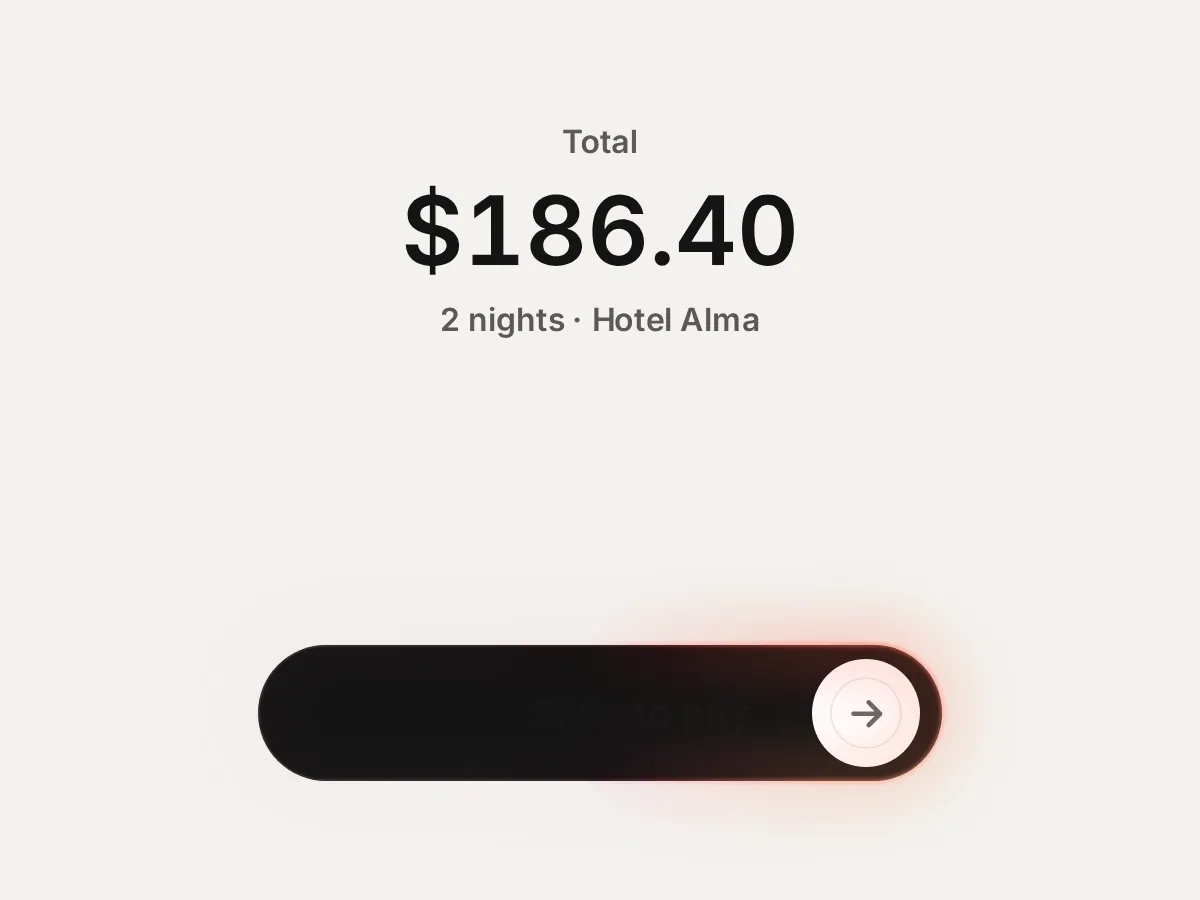
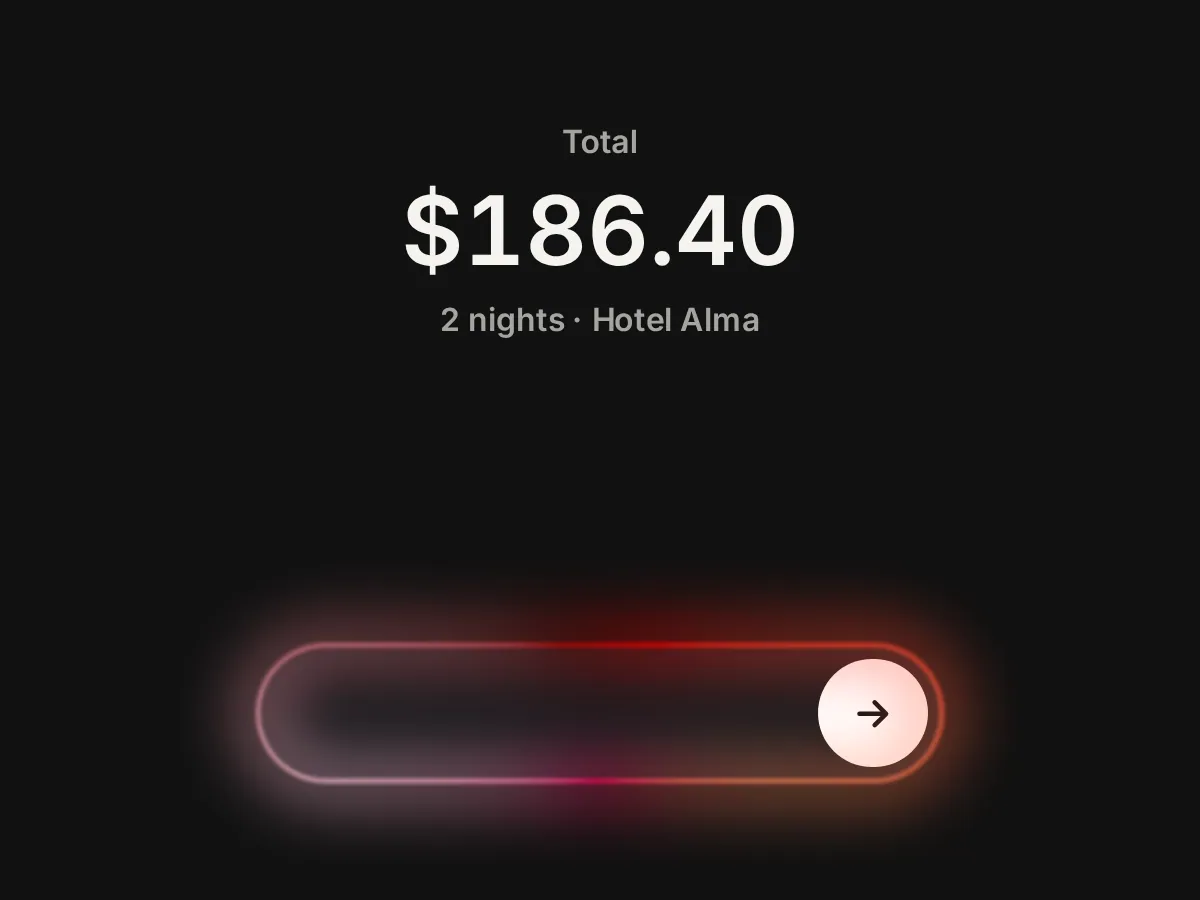
Slide to Pay, a SwiftUI Slide to Pay Button for iOS 17+, in its live preview. Open Code for the Swift source.
// Copyright (c) 2026 Saivion Hayes
//
// Permission is hereby granted, free of charge, to any person obtaining a copy
// of this software and associated documentation files (the "Software"), to deal
// in the Software without restriction, including without limitation the rights
// to use, copy, modify, merge, publish, and distribute the Software as part of
// an application, website, or product, subject to the following conditions:
//
// The above copyright notice and this permission notice shall be included in all
// copies or substantial portions of the Software.
//
// Commons Clause Restriction
//
// You may use this Software, including for any commercial purpose, so long as
// you do not sell, sublicense, or redistribute the components themselves, whether
// alone, in a bundle, or as a ported version.
//
// THE SOFTWARE IS PROVIDED "AS IS", WITHOUT WARRANTY OF ANY KIND, EXPRESS OR
// IMPLIED, INCLUDING BUT NOT LIMITED TO THE WARRANTIES OF MERCHANTABILITY,
// FITNESS FOR A PARTICULAR PURPOSE AND NONINFRINGEMENT. IN NO EVENT SHALL THE
// AUTHORS OR COPYRIGHT HOLDERS BE LIABLE FOR ANY CLAIM, DAMAGES OR OTHER
// LIABILITY, WHETHER IN AN ACTION OF CONTRACT, TORT OR OTHERWISE, ARISING FROM,
// OUT OF OR IN CONNECTION WITH THE SOFTWARE OR THE USE OR OTHER DEALINGS IN THE
// SOFTWARE.

import SwiftUI

/// Colors for `SlideToPay`. `.standard` is the house palette.
public struct SlideToPayStyle: Sendable {
    /// The track.
    public var track: Color
    /// The track's faint edge.
    public var edge: Color
    /// The words on the track.
    public var label: Color
    /// The thumb.
    public var thumb: Color
    /// The arrow on the thumb.
    public var onThumb: Color
    /// The folded check's fill.
    public var accent: Color
    /// The check mark.
    public var onAccent: Color

    public init(
        track: Color = SlideToPayStyle.adaptive(light: 0x141414, dark: 0x1C1C1F),
        edge: Color = Color.white.opacity(0.08),
        label: Color = SlideToPayStyle.adaptive(light: 0xF4F3EF, dark: 0xF4F3EF),
        thumb: Color = .white,
        onThumb: Color = SlideToPayStyle.adaptive(light: 0x141414, dark: 0x141414),
        accent: Color = Color(red: 1, green: 0, blue: 0),
        onAccent: Color = SlideToPayStyle.adaptive(light: 0x141414, dark: 0x141414)
    ) {
        self.track = track
        self.edge = edge
        self.label = label
        self.thumb = thumb
        self.onThumb = onThumb
        self.accent = accent
        self.onAccent = onAccent
    }

    public static let standard = SlideToPayStyle()

    /// A color that follows the appearance, from two 0xRRGGBB values.
    public static func adaptive(light: UInt32, dark: UInt32) -> Color {
        Color(UIColor { @Sendable traits in
            let hex = traits.userInterfaceStyle == .dark ? dark : light
            return UIColor(red: CGFloat(hex >> 16 & 0xFF) / 255, green: CGFloat(hex >> 8 & 0xFF) / 255, blue: CGFloat(hex & 0xFF) / 255, alpha: 1)
        })
    }
}

/// A slide-to-confirm track that folds into a check once you reach the end.
///
/// The control fills the width you give it, 60 points tall. Sliding to the end sets `isComplete` and calls `action`
/// once; set `isComplete` back to `false` to unfold the track for another go. VoiceOver confirms with a double tap.
///
/// - Parameters:
///   - title: The words on the track.
///   - isComplete: Whether the slide has been made. The track stays folded while it is `true`.
///   - style: Colors. Defaults to the house palette, adapting to light and dark.
///   - action: What to do once the thumb reaches the end.
public struct SlideToPay: View {
    public typealias Style = SlideToPayStyle

    @Environment(\.accessibilityReduceMotion) private var reduceMotion
    @Environment(\.isEnabled) private var isEnabled
    @Binding private var isComplete: Bool
    @State private var width: CGFloat = 300
    /// How far the thumb has travelled, in points.
    @State private var drag: CGFloat = 0
    @State private var dragging = false
    @State private var folded: Bool
    @State private var committing = false
    /// How tightly the light gathers under the thumb, 0 (all round the track) to 1.
    @State private var gather: Double = 0.9
    /// How bright the light is, 0 to 1.
    @State private var energy: Double = 0.25
    /// The ring of light let go on completion, 0 to 1.
    @State private var burst: Double = 0
    @State private var finishing: Task<Void, Never>?

    private let title: String
    private let style: Style
    private let action: () -> Void

    public init(_ title: String = "Slide to pay", isComplete: Binding<Bool>, style: Style = .standard, action: @escaping () -> Void) {
        self.title = title
        self._isComplete = isComplete
        self.style = style
        self.action = action
        self._folded = State(initialValue: isComplete.wrappedValue)
    }

    private static let height: CGFloat = 60
    private static let thumbSize: CGFloat = 48
    private static let inset: CGFloat = (height - thumbSize) / 2

    private var travel: CGFloat { max(1, width - Self.thumbSize - Self.inset * 2) }
    private var progress: CGFloat { min(1, max(0, drag / travel)) }
    private var motion: PieceMotion { PieceMotion(reduceMotion: reduceMotion) }

    public var body: some View {
        Color.clear
            .frame(maxWidth: .infinity)
            .frame(height: Self.height)
            .onGeometryChange(for: CGFloat.self) { $0.size.width } action: { width = $0 }
            .overlay { track }
            .fontWeight(.semibold)
            .opacity(isEnabled ? 1 : 0.45)
            .accessibilityElement(children: .ignore)
            .accessibilityLabel(folded ? "Done" : title)
            .accessibilityHint(folded ? "" : "Double tap to confirm")
            .accessibilityAddTraits(.isButton)
            .accessibilityAction { if isEnabled { commit() } }
            .sensoryFeedback(.impact(weight: .light, intensity: 0.6), trigger: dragging) { _, new in new }
            .sensoryFeedback(.success, trigger: folded) { _, new in new }
            .onChange(of: isComplete) { _, done in done ? fold() : unfold() }
    }

    private var track: some View {
        let size = folded ? Self.height : width
        let thumbCentre = CGPoint(x: Self.inset + drag + Self.thumbSize / 2, y: Self.height / 2)
        return ZStack(alignment: .leading) {
            Capsule()
                .fill(folded ? style.accent : style.track)
            Capsule()
                .strokeBorder(style.edge, lineWidth: 1)
                .opacity(folded ? 0 : 1)
            Text(title)
                .foregroundStyle(style.label)
                .lineLimit(1)
                .minimumScaleFactor(0.8)
                .frame(maxWidth: .infinity)
                .padding(.leading, Self.thumbSize)
                .padding(.trailing, Self.inset * 2)
                .opacity(folded ? 0 : Double(max(0, 1 - progress * 1.6)))
            thumb
                .offset(x: Self.inset + drag)
                .opacity(folded ? 0 : 1)
            Image(systemName: "checkmark")
                .font(.title3.weight(.semibold))
                .foregroundStyle(style.onAccent)
                .frame(maxWidth: .infinity)
                .scaleEffect(folded ? 1 : 0.4)
                .opacity(folded ? 1 : 0)
        }
        .frame(width: size, height: Self.height)
        .overlay {
            SlideToPayAura(focus: folded ? CGPoint(x: size / 2, y: Self.height / 2) : thumbCentre, gather: gather, energy: energy)
                .allowsHitTesting(false)
        }
        .background {
            SlideToPayBurst(progress: burst)
                .allowsHitTesting(false)
        }
    }

    private var thumb: some View {
        Circle()
            .fill(style.thumb)
            .frame(width: Self.thumbSize, height: Self.thumbSize)
            .overlay {
                Image(systemName: "arrow.right")
                    .font(.body.weight(.semibold))
                    .foregroundStyle(style.onThumb)
            }
            .scaleEffect(dragging && !reduceMotion ? 0.94 : 1)
            .animation(motion.press, value: dragging)
            .contentShape(Circle().inset(by: -8))
            .gesture(slide)
    }

    private var slide: some Gesture {
        DragGesture(minimumDistance: 0)
            .onChanged { value in
                guard !folded, !committing else { return }
                dragging = true
                drag = PieceMotion.rubberBand(value.translation.width, in: 0...travel, limit: 18)
                energy = 0.25 + 0.45 * Double(progress)
            }
            .onEnded { value in
                guard !folded, !committing else { return }
                dragging = false
                let projected = PieceMotion.project(drag, velocity: value.velocity.width)
                if progress > 0.9 || projected > travel * 1.15 {
                    commit()
                } else {
                    withAnimation(motion.settle(velocity: value.velocity.width, from: drag, to: 0)) { drag = 0 }
                    withAnimation(.easeOut(duration: 0.6)) { energy = 0.25 }
                }
            }
    }

    // MARK: Actions

    private func commit() {
        guard !folded, !committing else { return }
        committing = true
        dragging = false
        withAnimation(.easeOut(duration: 0.18)) { drag = travel }
        withAnimation(.easeInOut(duration: reduceMotion ? 0.2 : 0.45)) {
            gather = 0
            energy = 1
        }
        finishing?.cancel()
        finishing = Task { @MainActor in
            try? await Task.sleep(for: .milliseconds(reduceMotion ? 200 : 420))
            guard !Task.isCancelled else { return }
            isComplete = true
            fold()
            action()
        }
    }

    private func fold() {
        committing = false
        guard !folded else { return }
        // No bounce on the fold: an overshoot would squeeze the track narrower than it is tall.
        withAnimation(reduceMotion ? .easeOut(duration: 0.2) : .spring(duration: 0.5, bounce: 0)) {
            folded = true
            drag = travel
            gather = 0
        }
        withAnimation(.easeOut(duration: 1.5).delay(0.2)) { energy = 0.35 }
        guard motion.allowsAmbient else { return }
        burst = 0
        withAnimation(.easeOut(duration: 1.3).delay(0.12)) { burst = 1 }
    }

    private func unfold() {
        finishing?.cancel()
        committing = false
        guard folded else { return }
        withAnimation(motion.morph) {
            folded = false
            drag = 0
            gather = 0.9
            energy = 0.25
        }
        burst = 0
    }
}

/// The house aura: five soft lights, red, coral, hot pink, blush and a deep red, drifting slowly round the track's
/// edge as one blended gradient. A wide dim bloom and a faint coloured edge, gathered toward `focus`. Still under
/// Reduce Motion, and a plain red edge under Reduce Transparency.
private struct SlideToPayAura: View, Animatable {
    var focus: CGPoint
    var gather: Double
    var energy: Double

    @Environment(\.colorScheme) private var colorScheme
    @Environment(\.accessibilityReduceMotion) private var reduceMotion
    @Environment(\.accessibilityReduceTransparency) private var reduceTransparency
    @State private var start = Date()

    nonisolated var animatableData: AnimatablePair<AnimatablePair<CGFloat, CGFloat>, AnimatablePair<Double, Double>> {
        get { AnimatablePair(AnimatablePair(focus.x, focus.y), AnimatablePair(gather, energy)) }
        set {
            focus = CGPoint(x: newValue.first.first, y: newValue.first.second)
            gather = newValue.second.first
            energy = newValue.second.second
        }
    }

    /// How far past the track the bloom may reach.
    private static let spread: CGFloat = 40

    var body: some View {
        if reduceTransparency {
            Capsule()
                .strokeBorder(Color(red: 1, green: 0, blue: 0).opacity(0.2 + 0.6 * energy), lineWidth: 1.5)
        } else {
            let flowing = PieceMotion(reduceMotion: reduceMotion).allowsAmbient
            TimelineView(.animation(paused: !flowing)) { context in
                let glow = Self.glow(at: flowing ? context.date.timeIntervalSince(start) : 0)
                ZStack {
                    Capsule()
                        .stroke(glow, lineWidth: 14)
                        .blur(radius: 14)
                        .opacity(0.8 * energy)
                    Capsule()
                        .stroke(glow, lineWidth: 2)
                        .blur(radius: 1)
                        .opacity(0.15 + 0.75 * energy)
                }
                .padding(Self.spread)
                .mask {
                    GeometryReader { proxy in
                        RadialGradient(
                            stops: [.init(color: .white, location: 0), .init(color: .white.opacity(1 - gather), location: 1)],
                            center: UnitPoint(
                                x: (focus.x + Self.spread) / max(1, proxy.size.width),
                                y: (focus.y + Self.spread) / max(1, proxy.size.height)
                            ),
                            startRadius: 0,
                            endRadius: 120
                        )
                    }
                }
                .padding(-Self.spread)
                .blendMode(colorScheme == .dark ? .plusLighter : .normal)
            }
        }
    }

    /// The five lights at time `t`, their stops drifting a little and the whole ring turning slowly.
    static func glow(at t: TimeInterval) -> AngularGradient {
        let colors: [Color] = [
            Color(red: 1, green: 0, blue: 0),
            Color(red: 1, green: 0.54, blue: 0.36),
            Color(red: 1, green: 0, blue: 0.36),
            Color(red: 1, green: 0.76, blue: 0.84),
            Color(red: 0.72, green: 0.04, blue: 0.02),
        ]
        var stops = colors.enumerated().map { index, color in
            Gradient.Stop(color: color, location: Double(index) * 0.2 + 0.05 * sin(t * 0.45 + Double(index) * 1.7))
        }
        stops[0].location = 0
        stops.append(Gradient.Stop(color: colors[0], location: 1))
        return AngularGradient(stops: stops, center: .center, angle: .degrees(t * 14))
    }
}

/// A soft ring of light in the track's own shape that grows out and fades as `progress` runs from 0 to 1.
private struct SlideToPayBurst: View, Animatable {
    var progress: Double

    @Environment(\.accessibilityReduceTransparency) private var reduceTransparency

    nonisolated var animatableData: Double {
        get { progress }
        set { progress = newValue }
    }

    var body: some View {
        if progress > 0, progress < 1, !reduceTransparency {
            Capsule()
                .stroke(SlideToPayAura.glow(at: 0), lineWidth: 3 * (1 - progress) + 1)
                .blur(radius: 3 + 6 * progress)
                .scaleEffect(1 + 1.6 * progress)
                .opacity(1 - progress)
        }
    }
}

// MARK: - Example

/// A hotel checkout.
private struct SlideToPayExample: View {
    @State private var paid = false

    var body: some View {
        VStack(spacing: 6) {
            Text("Total")
                .font(.subheadline)
                .foregroundStyle(.secondary)
            Text("$186.40")
                .font(.system(size: 44, design: .rounded))
                .monospacedDigit()
            Text(paid ? "Paid · receipt sent" : "2 nights · Hotel Alma")
                .font(.subheadline)
                .foregroundStyle(.secondary)
                .contentTransition(.opacity)
            Spacer()
            SlideToPay(isComplete: $paid) {}
                .padding(.horizontal, 24)
            Button("Start over") {
                paid = false
            }
            .font(.subheadline)
            .padding(.top, 18)
            .opacity(paid ? 1 : 0)
        }
        .fontWeight(.semibold)
        .padding(.top, 120)
        .padding(.bottom, 40)
        .frame(maxWidth: .infinity, maxHeight: .infinity)
        .background(SlideToPayStyle.adaptive(light: 0xF3F2EE, dark: 0x121212))
        .animation(.easeOut(duration: 0.3), value: paid)
    }
}

#Preview("Light") {
    SlideToPayExample()
}

#Preview("Dark") {
    SlideToPayExample()
        .preferredColorScheme(.dark)
}

// MARK: - Piece motion
//
// The SwiftPieces motion language: shared spring tokens and gesture physics, with the same values in every
// piece. Each piece carries a copy of only the parts it uses, so this file stands alone. Generated from
// registry/foundation/PieceMotion.swift in the SwiftPieces repo; edit it there, not here.
// swiftpieces-motion: 1.1.0 (core, momentum, rubberBand)

/// The SwiftPieces motion language: five spring tiers, and a named role for every moment a piece moves,
/// each with its Reduce Motion substitute.
///
/// Build one from the environment, `PieceMotion(reduceMotion: reduceMotion)`, and pick the role that names
/// what just happened. Never animate the tracking of a finger: set gesture state directly in `onChanged`, so the
/// surface stays under the finger, and spring only the release.
private struct PieceMotion {
    var reduceMotion = false

    // Tiers. Overshoot and settle times are measured from rest with SwiftUI's Spring.
    /// No overshoot, 90% in about 90ms. A press arriving under the finger.
    static var tight: Spring { Spring(duration: 0.14, bounce: 0) }
    /// About 2.8% overshoot, 90% in about 140ms. Snapping to a detent, page or segment.
    static var responsive: Spring { Spring(duration: 0.32, bounce: 0.25) }
    /// About 8.4% overshoot. Visible give: a release, a return from past an edge, a drag settling home.
    static var elastic: Spring { Spring(duration: 0.42, bounce: 0.38) }
    /// About 15% overshoot. A resolved action landing. At most once per interaction.
    static var expressive: Spring { Spring(duration: 0.48, bounce: 0.48) }
    /// About 1.5% overshoot, unhurried. Opening large surfaces and ambient change.
    static var calm: Spring { Spring(duration: 0.5, bounce: 0.2) }

    /// Reduce Motion: settles become this short spring with no overshoot.
    private static var still: Animation { .spring(duration: 0.25, bounce: 0) }

    // Roles.
    /// Touch-down. Starts on the same frame and never bounces under the finger.
    var press: Animation { .spring(Self.tight) }
    /// The finger lifts off a pressed surface, which springs back through rest.
    var release: Animation { reduceMotion ? Self.still : .spring(Self.elastic) }
    /// A dragged thing comes to rest. With a gesture's velocity, use `settle(velocity:from:to:)` instead.
    var settle: Animation { reduceMotion ? Self.still : .spring(Self.elastic) }
    /// Lands on a detent, page or segment.
    var snap: Animation { reduceMotion ? Self.still : .spring(Self.responsive) }
    /// A number, a chart value or anything else people read moves to its new value. Never overshoots, so it
    /// never shows a value that isn't true.
    var value: Animation { reduceMotion ? Self.still : .spring(duration: 0.35, bounce: 0) }
    /// Comes back from past a limit: a pull beyond the edge, a value pushed against its bound.
    var rebound: Animation { reduceMotion ? Self.still : .spring(Self.elastic) }
    /// A shape or container changes size, corner radius or form, with a little give at the end.
    var morph: Animation { reduceMotion ? Self.still : .spring(duration: 0.4, bounce: 0.2) }
    /// Something appears, opens or expands. Opening is a little slower than closing.
    var reveal: Animation { reduceMotion ? .easeOut(duration: 0.2) : .spring(Self.calm) }
    /// Something leaves, closes or collapses. Quick and firm, out of the way.
    var dismiss: Animation { reduceMotion ? .easeIn(duration: 0.18) : .spring(duration: 0.3, bounce: 0.08) }
    /// A resolved action lands: a check, a sent state, a reaction.
    var success: Animation { reduceMotion ? .easeOut(duration: 0.24) : .spring(Self.expressive) }
    /// A refused action. Firm, no wobble; `pieceShake` adds the movement.
    var error: Animation { reduceMotion ? .easeOut(duration: 0.2) : .spring(Self.responsive) }
    /// Slow ambient change. Loops themselves stop under Reduce Motion: check `allowsAmbient`.
    var ambient: Animation { reduceMotion ? .easeInOut(duration: 0.3) : .spring(Self.calm) }

    /// Loops, drifts, idle breathing and parallax run only when this is true.
    var allowsAmbient: Bool { !reduceMotion }

    /// A moving transition, or a plain fade under Reduce Motion.
    func transition(_ transition: AnyTransition) -> AnyTransition {
        reduceMotion ? .opacity : transition
    }

    /// For content replaced inside a container that stays put (a label, a glyph, a count): the old content
    /// blurs out as the new one sharpens in. A fade under Reduce Motion.
    @MainActor var swap: AnyTransition {
        reduceMotion ? .opacity : AnyTransition(.blurReplace)
    }
}

extension PieceMotion {
    /// Where a flick at `velocity` (pt/s) coasts to. 0.998 coasts like a scroll view; 0.99 suits detents.
    nonisolated static func project(_ position: CGFloat, velocity: CGFloat, decelerationRate: CGFloat = 0.99) -> CGFloat {
        position + velocity / 1000 * decelerationRate / (1 - decelerationRate)
    }

    /// The candidate closest to `value`.
    nonisolated static func nearest(_ value: CGFloat, in candidates: [CGFloat]) -> CGFloat {
        candidates.min { abs($0 - value) < abs($1 - value) } ?? value
    }

    /// A settle that leaves at the finger's speed (pt/s). One per axis, each on its own `.offset(x:)` / `.offset(y:)`:
    /// a spring takes one velocity. SwiftUI's own velocity carry-over is unreliable; this always carries it.
    func settle(velocity: CGFloat, from current: CGFloat, to target: CGFloat, spring: Spring = PieceMotion.elastic) -> Animation {
        let spring = reduceMotion ? Spring(duration: 0.25, bounce: 0) : spring
        let distance = target - current
        guard abs(distance) >= 1 else { return .spring(spring) }
        // In whole distances per second, capped near the spring's frequency: a hard flick adds give, not a slingshot.
        // At exactly the frequency a critically damped spring cannot pass its target, so Reduce Motion stops there.
        let cap = 2 * Double.pi / spring.duration * (reduceMotion ? 1 : 1.5)
        let relative = min(max(Double(velocity / distance), -cap), cap)
        return .interpolatingSpring(spring, initialVelocity: relative)
    }
}

extension PieceMotion {
    /// A scroll view's edge resistance for a pull `overshoot` points past a limit; never reaches `limit`.
    /// About 24 to 40 for thumbs and toggles, 60 to 120 for cards and sheets. Band the total pull, not deltas.
    nonisolated static func rubberBand(_ overshoot: CGFloat, limit: CGFloat, coefficient: CGFloat = 0.55) -> CGFloat {
        guard limit > 0, overshoot != 0 else { return 0 }
        let banded = (1 - 1 / (abs(overshoot) * coefficient / limit + 1)) * limit
        return overshoot < 0 ? -banded : banded
    }

    /// `value` inside `range` passes through unchanged; past either end it moves with rubber-band resistance.
    nonisolated static func rubberBand(_ value: CGFloat, in range: ClosedRange<CGFloat>, limit: CGFloat, coefficient: CGFloat = 0.55) -> CGFloat {
        if value < range.lowerBound { return range.lowerBound + rubberBand(value - range.lowerBound, limit: limit, coefficient: coefficient) }
        if value > range.upperBound { return range.upperBound + rubberBand(value - range.upperBound, limit: limit, coefficient: coefficient) }
        return value
    }
}

// swiftpieces-motion: end- Type
- SlideToPay
- Files
- SlideToPay.swift
- Depends on
- Nothing (Apple frameworks only)
- Version
- 1.0.0
Colors for SlideToPay. .standard is the house palette.
Notes
- Drag the thumb to the end to confirm. A soft house aura gathers under your thumb and follows it, growing brighter the further you go.
- Let go before the end and the thumb springs back with the speed you released it at, and the light drains back with it. A quick flick near the end counts.
- At the end the light floods the whole track, the track folds into a red check and a soft ring of light lets go, with a success haptic.
actionruns once. isCompletestaystruewhile it is folded. Set it back tofalseto unfold the track, for example if the payment fails.- It fills the width you give it and is 60pt tall, with a 48pt thumb.
- VoiceOver reads it as a button and confirms with a double tap.
- Under Reduce Motion the light holds still and still follows the thumb, and there is no ring. Under Reduce Transparency the aura becomes a plain red edge.
Usage
SlideToPayExample()Install
Pick one. Run it from the folder that contains your .xcodeproj and the files land inside your app.
Terminal
Or ask your coding agent · Claude Code, Cursor or Xcode, once the MCP server is connected
Or copy the source above into your app.
New to SwiftUI?If you know React, CSS or Tailwind, SwiftUI is easier to pick up than it looks.Try real app patterns first
Building a whole app? See SwiftPieces Pro →
More SwiftUI buttons and controls
All buttons and controls →Build it yourself: SwiftUI motion guide · SwiftUI buttons guide · SwiftUI haptics guide
